
Before and After AI Pearl Earrings Model Results
Pearl earrings often rely on details that are difficult to judge from a product-only photo, such as drop position, pearl shape, ear coverage, and how subtle the design feels once worn. These examples show how different pearl earring styles can add useful ear-side detail for product pages, ads, and listing sections.
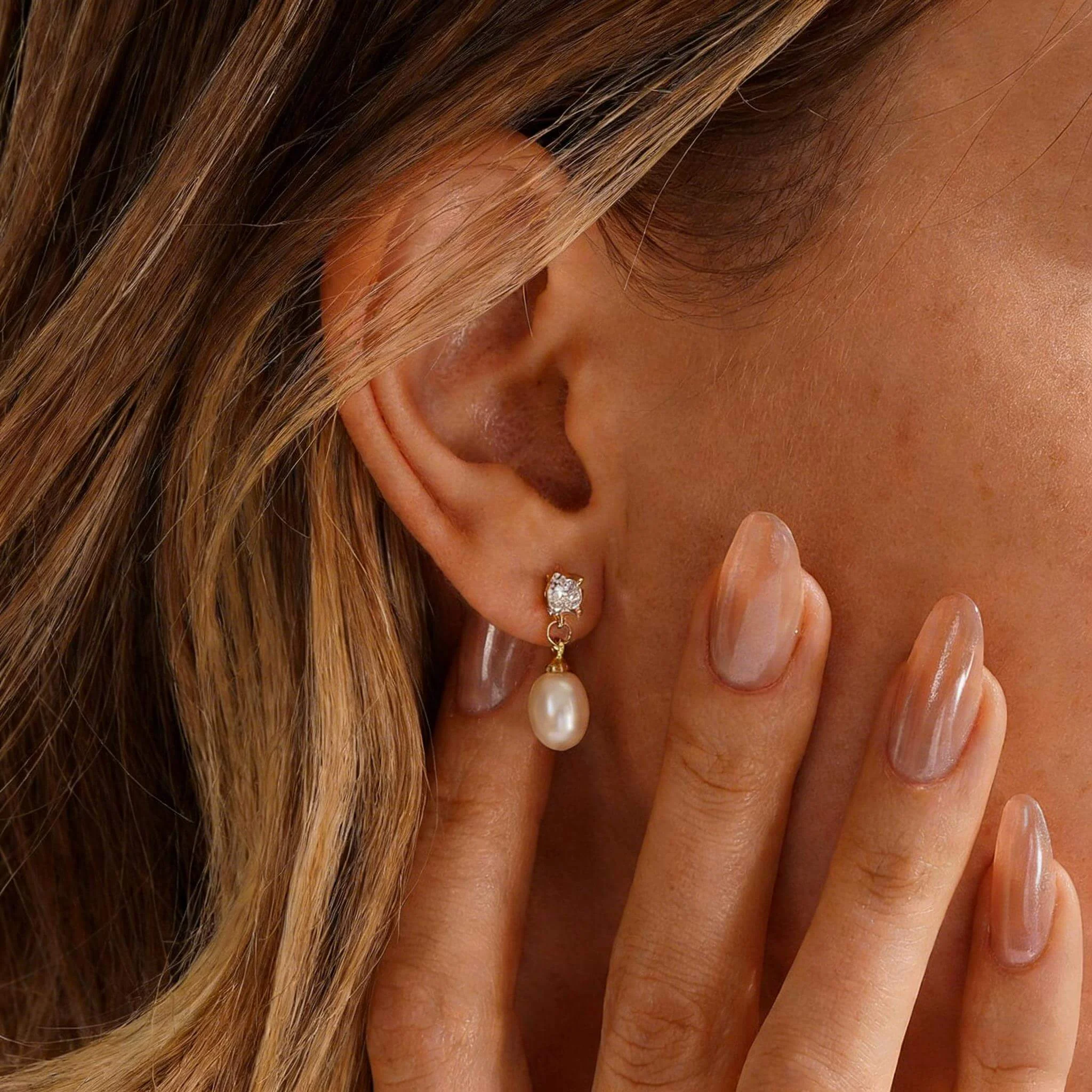
Pearl drop earrings can look shorter or longer than expected on a plain background. Showing the earrings near the ear helps shoppers read the hanging position, overall balance, and occasion fit more quickly.
Baroque pearl earrings benefit from an ear-side view because the uneven shape is part of the appeal. A standalone item image can show the outline, while the ear-side version helps shoppers read the organic shape as artistic, refined, or bold near the face.
Cluster pearl earrings can look busy when several pearls sit close together in a standalone product photo. Showing the pair near the ear makes pearl count, spacing, and coverage easier to judge before shoppers compare it with simpler styles.
Minimal pearl earrings can look overly simple in a product-only photo, especially when the pearl is small or the metal detail is fine. A worn image helps shoppers judge the design as subtle, refined, and suitable for daily wear or gifting.
What Is an AI Pearl Earrings Model?
This tool turns a pearl earring product photo into on-ear product images for ecommerce pages, ads, and listings. It helps shoppers judge pearl proportion, ear placement, hanging shape, and styling direction for pearl studs, drops, hoops, baroque designs, and bridal earrings.
Why Pearl Earrings Need More Than a Product Shot
Pearl earrings often need more than a clean item shot because buyers are not only looking at the item itself. They also want to judge how well the style suits a gift, a bridal edit, a polished outfit, or an everyday jewelry page. On-ear product images give sellers a clearer way to answer those questions before shoppers leave the listing.
Show the Wearing Appeal
A product photo can show pearl shape and hardware, but it may not show why the earrings feel desirable in use. An ear-side image helps shoppers connect the piece with a finished look, making the style easier to imagine beyond a simple item photo.
Highlight Pearl-Metal Detail
Many pearl earrings depend on the relationship between pearl tone and metal finish. A styled image helps buyers see how the gold, silver, hook, hoop, or small accent detail supports the pearl instead of competing with it.
Help Buyers Choose Faster
Shoppers often compare pearl earrings for different occasions, from simple outfits to weddings or gift purchases. A stronger image set helps them read the use case faster, which can make the listing feel easier to trust.
Fewer Model Shoots
Sellers may have many pearl stud, hoop, drop, and baroque variations in one collection. AI-generated on-ear images can help add model-style context across more SKUs without arranging separate shoots for every small change.
Stronger Product Gallery
A fuller image set gives shoppers more than one way to understand the product. Pairing clean item photos with on-ear images can support detail checks, comparison, collection pages, ads, and listing sections that need more than a single product angle.
Faster Product Launches
Pearl earring collections often include seasonal edits, bridal drops, and metal-tone variations. Faster image creation helps sellers prepare launch pages and campaign assets earlier, especially when new styles need to go live quickly.
Pearl Earring Styles That Benefit from On-Ear Images
Different pearl earring styles raise different questions for shoppers. A classic stud, a bridal pair, a freshwater design, a hoop, a dangle style, or a threader earring may need to show finish quality, occasion fit, structure, or styling mood before buyers feel ready to choose.
Pearl Stud Earrings
Pearl stud earrings are often simple in shape, so buyers pay close attention to how refined, noticeable, or understated they appear. A clean ear-model photo can help explain the value of a classic stud without making the listing rely only on a small front-facing item image.
This style works especially well for gift listings, everyday jewelry pages, and basic pearl collections. It helps sellers present a simple pair as polished and purchase-worthy instead of looking too ordinary in the product set.
For small studs, buyers often want to know if the finished look feels neat enough for work, gifting, or daily outfits. Showing them in use makes that quiet value easier to see.
Bridal Pearl Earrings
Bridal pearl earrings need to feel elegant enough for an important moment. Buyers may imagine the earrings with a wedding dress, soft makeup, an updo, or a formal jewelry edit before they feel confident choosing them.
For sellers, this type of image helps add occasion value to the listing. It can support bridal collections, bridesmaid accessories, anniversary gifts, and special-event pages where emotion and styling direction matter as much as the item itself.
This is also useful when the earrings are delicate rather than dramatic. A closer styled image can help shoppers judge if the earrings add enough ceremony without feeling too heavy for the overall bridal look.
Freshwater Pearl Earrings
Freshwater pearl earrings often have natural differences in shape, tone, and finish. Buyers may want to see if those variations come across as charming, handmade, modern, or more casual once the earrings are presented as part of a finished look.
This is helpful for Etsy shops, handmade brands, and independent jewelry labels. It allows sellers to present the natural character of freshwater pearls in a way that feels intentional rather than uneven or inconsistent.
For handmade or small-batch collections, this can explain why two pairs may not look identical and turn natural variation into a product feature instead of a concern.
Pearl Hoop Earrings
Pearl hoop earrings combine a familiar hoop shape with softer pearl detail, so buyers often need to judge the look as playful, elegant, or more fashion-led. A standalone item photo may show the curve, but not always how the pearls change the overall impression.
Showing this style in place helps shoppers read the hoop size, pearl placement, and styling direction more quickly. It is useful for sellers who want to position the pair as a modern pearl option rather than a traditional stud or classic drop design.
This also matters when pearls are set along part of the hoop or used as a small accent. Buyers can better judge if the earrings feel light and subtle or more decorative once presented as a finished style.
Pearl Dangle Earrings
Pearl dangle earrings often depend on movement, lower-ear placement, and how the hanging element relates to the jawline or neckline. Buyers may hesitate if the product photo does not make the final styling effect clear enough.
An ear-model result can make the structure easier to read by showing how the pearl element connects with the top detail. This helps buyers decide whether the earrings feel light, dressy, dramatic, or suitable for an evening outfit.
For longer designs, shoppers also care if the earring feels graceful or too bold for their usual style. Showing the full hanging shape can help sellers set the right expectation before the buyer reaches the product details.
Pearl Threader Earrings
Pearl threader earrings rely on fine chain detail and a lighter, more fluid shape. In a product-only photo, the chain can look too thin or hard to understand, especially when shoppers are judging whether the style feels delicate or distinctive.
Showing the earring in place helps make the construction easier to understand. Buyers can see how the pearl and chain work together, while sellers can present the design as modern, lightweight, and suitable for a more refined jewelry collection.
This format is especially helpful for designs with a long pull-through chain or a small pearl at the end. It gives shoppers a clearer sense of the intended hanging shape, which can reduce confusion around styles that are less familiar than studs or hoops.
How to Generate Pearl Earring Model Photos
Create pearl earring photos for your store in a simple workflow: upload a clear source image, choose a suitable model style, then check the final image before adding it to your product page.
Step 1
Upload a Clear Product Photo
Start with a sharp pearl earring photo that clearly shows the pearl surface, metal detail, and attachment area.
Step 2
Choose a Model Style
Select a model style that matches the look you want for your product page, from a clean close-up to a more polished ecommerce image.
Step 3
Generate and Check the Image
Create the image, then check shape, hardware, placement, and overall match before use.
Pearl Earring Images for Stores, Listings, and Ads
After review, sellers can use the finished photos across different sales touchpoints. Keep the original item photos as the main reference for exact details, and use extra images to help shoppers compare each option with more confidence.
Etsy Listings
Etsy shoppers often compare many similar designs before clicking. Photos with an ear model can help handmade studs, freshwater pieces, bridal designs, and gift-focused items stand out with a more polished shopping-page look while still keeping the product itself easy to understand.
Shopify Product Pages
For Shopify stores, these photos can support close-ups, material notes, sizing information, and collection storytelling. They help independent brands present a pair as classic, modern, romantic, or occasion-ready without arranging a separate shoot for every new style.
Amazon Secondary Images
For Amazon, use these photos as secondary listing images, brand content, storefront materials, or ad creatives. Do not treat them as a replacement for required main images, and always check the latest marketplace image rules before use.
Ads and Social Launches
Pearl earring campaigns often need fresh creatives for new arrivals, bridal edits, seasonal drops, and gift promotions. Campaign photos can help sellers prepare social posts, ad variations, and launch banners faster before sending traffic to the product page.
Review Pearl Earring Results Before Publishing
Generated pearl earring images can save time for new listings, but fine jewelry details still need a final check. Before adding one to your store, compare it with the original item photo and make sure shape, hardware, attachment points, and overall presentation still match the item you sell.
Pearl Details
Pearl Shape
Check that each pearl keeps its original round, oval, button, baroque, or irregular form. Even a small change in shape can make the pair look like a different product.
Pearl Count
Count the pearls carefully, especially for cluster, dangle, and multi-pearl designs. Extra or missing pearls can confuse shoppers and make the image inconsistent with the real item.
Pearl Finish and Tone
Review the color, highlight, and surface character. The final image should not make the pearls look overly glossy, too dull, or noticeably different from the source photo.
Earring Structure
Left and Right Match
Make sure both sides still look like a pair. This matters for studs, bridal pieces, and any style sold with a balanced left-right design.
Metal Setting
Check the prongs, bezel, cup, wire, or frame around the pearl. These small parts should stay close to the actual product structure.
Post, Hook, Hoop, or Chain Connection
Review the part that connects the earring to the ear. The post, hook, hoop, or chain should not be removed, reshaped, or hidden in a way that changes how the item is understood.
Final Image Review
Length and Placement
For dangle, drop, or threader styles, make sure the hanging part sits naturally and does not look stretched, shortened, floating, or disconnected.
Skin and Hair Contact
Make sure the earring does not blend into skin, disappear behind hair, or attach to the wrong area. Small placement issues can make an otherwise useful image feel less trustworthy.
Store Consistency
Compare the final image with the rest of your listing. It should support the existing product photos instead of introducing a different finish, style direction, or selling promise.
AI Pearl Earrings Model FAQ
These answers cover common questions about using generated pearl earring photos for ecommerce pages, marketplace content, ads, and final review. Use them to review image quality, detail accuracy, sales-channel use, and final checks before launch.
Can it show pearl size and drop length clearly?
It can help shoppers understand size and hanging style more clearly than a product-only image. For a better output, start with a clean source photo and check the final version to make sure the scale and lower section still look believable.
Can I create bridal pearl earring images?
Yes. Bridal pearl earrings are a strong use case because shoppers often care about occasion fit, styling direction, and how well the earrings suit a wedding, bridesmaid look, anniversary gift, or formal event.
What kind of source image works best?
A clear, sharp source image works best. Use a photo where the pearl, metal detail, hook, post, hoop, or chain is easy to see, with minimal shadows, blur, reflections, or background distractions.
Are AI-generated pearl earring photos accurate enough for product pages?
They can be useful for supporting product pages, but they should always be checked before use. Pearl shape, metal setting, attachment points, color tone, and left-right match should stay close to the real item you sell.
Can I use the images for Amazon, Etsy, or Shopify?
Yes, but the use case depends on the platform. For Etsy and Shopify, the finished photos can support listings, product pages, collection pages, ads, and launch content. For Amazon, use them carefully as secondary listing images, brand content, ads, or storefront materials, and always check the latest marketplace image rules before use.
Should these images replace original product photos?
No. Use generated photos as supporting content, not as a full replacement for original product photos. Your original images should remain the main reference for exact color, material, shape, finish, and construction.
What should I check before using the image?
Compare the generated image with the source item. Check pearl details, hardware, left-right balance, placement, and the match with your store’s product description.
Can I use the images for ads and social posts?
Yes. The finished photos can be used for ad creatives, social posts, launch banners, and seasonal campaigns. For best results, keep the message consistent with the real product details shown in your original photos.
Does it work for freshwater, bridal, and modern pearl styles?
Yes. It can support many pearl earring styles, including freshwater pearls, bridal designs, hoops, dangles, threaders, and classic studs. Always review the generated image to make sure the pearl finish, hardware, and overall style still match the item you sell.