
AI Diamond Earrings Model: From Product Photos to Model-Worn Images
A product photo can capture diamond shape, setting detail, and surface shine, but it may not show how much attention the stones draw in use. These before-and-after examples help shoppers judge sparkle, stone coverage, ear placement, and how fine detail translates when worn.
A product-only image can show grouped stones, but not how much space the design covers around the lobe. The finished result helps shoppers understand stone spread, sparkle balance, and cluster shape at ear scale.
Pavé styles often rely on fine stone rows that can look flat in product shots. The styled result gives buyers a clearer sense of surface shine, small-stone texture, and how polished the earrings appear.
A product photo can show the teardrop outline, but it may not make the length easy to judge. The on-ear image adds scale, lower-lobe placement, and a clearer sense of how the shape frames the face.
Halo earrings can look bright in a product image, but shoppers may still wonder how prominent the center stone appears. The result shows how the center stone and halo setting sit against the lobe.
Why Diamond Earrings Need More Than a Product Photo
Diamond earrings are small, reflective, and detail-heavy, so shoppers often need more than a close-up product image to make a confident choice. A wearing reference helps turn tiny details into clearer buying signals, from brilliance and carat presence to lobe proportion, craftsmanship, and fine-jewelry appeal.
Show Diamond Brilliance Clearly
Diamond earrings depend on how light moves across the stones. A plain catalog shot may show the outline, but it does not always express brightness, depth, or the lively finish buyers expect from diamond jewelry.
Show Carat Presence
Carat size can feel abstract online. Buyers may read the number and still wonder how noticeable the earrings will look in real use. A real-use reference gives a more practical sense of presence, especially for mini, fine, or bold designs.
Highlight Setting Craftsmanship
Prongs, bezels, pavé rows, halos, and small metal edges all influence perceived value. A close crop near the ear can help shoppers notice the construction, not just the stones themselves.
Help Buyers Judge Lobe Proportion
Diamond earrings can appear larger in close-up images than they feel in daily styling. Showing the piece near the ear helps reduce uncertainty around size, placement, and how balanced the design looks beside the face.
Support Gift and Bridal Decisions
Diamond earrings are often purchased for weddings, anniversaries, birthdays, and meaningful gifts. Styled presentation helps shoppers picture the piece with bridal looks, formal outfits, or everyday fine-jewelry use.
Build Confidence Before Checkout
When shoppers understand brightness, size impression, craftsmanship, and styling purpose faster, the product page feels more complete. This helps reduce hesitation and makes the earrings feel ready for a purchase decision.
Diamond Earring Styles That Need Better Wearing Context
Diamond earrings can serve very different moments, from daily fine jewelry to bridal looks and formal evening pieces. Each style raises its own buying questions around size impression, shine level, styling role, comfort, and occasion fit. This section helps sellers explain those differences more clearly across high-value diamond earring categories.
Diamond Stud Earrings
Classic studs are highly searched and often purchased as everyday fine jewelry, but they can still be difficult to evaluate from cropped detail shots alone. A half-carat pair, one-carat pair, and two-carat pair may look similar in a zoomed gallery, while their real presence can feel very different beside the face. Stone cut also matters, because round, oval, princess, and cushion shapes create different size impressions.
For sellers, this style needs clear comparison cues around stone presence, setting height, and left-right balance. Buyers often compare prong, bezel, martini, and halo-inspired settings before choosing a pair, especially for gifts or daily wear. Clearer wearing context can clarify size upgrades and help shoppers choose a carat option with more confidence.
Bridal Diamond Earrings
For bridal styling, shine alone is not enough; the piece needs to work with the dress, hairstyle, neckline, veil, and overall ceremony mood. A bride may love the stone arrangement in a close-up image but still hesitate if she cannot imagine the earrings beside soft makeup, pinned hair, satin, lace, or evening lighting. Wedding buyers also care about how elegant the piece feels in portraits.
This category benefits from styling that suggests romance, refinement, and special-occasion value without making the product feel overdone. It can help sellers position earrings for brides, bridesmaids, anniversary gifts, and formal collections. The goal is to present the pair as memorable, wearable, and aligned with a meaningful event.
Diamond Dangle Earrings
Longer hanging styles create questions around length, movement, and balance. Buyers may want a graceful drop for dinner, a brighter pair for a party, or a more dramatic design for a formal outfit, but measurement numbers do not always communicate that difference well. The lower stones, connector details, and lowest point of the design all affect how the pair frames the jawline.
For ecommerce pages, this category needs more than a clean close-up because the buying decision often depends on occasion and silhouette. A stronger wearing reference can show if the design feels soft, elegant, festive, or bold enough for evening wear. It also helps shoppers understand if the length feels comfortable for a full event or better suited for photo moments and statement styling.
Diamond Hoop Earrings
Hoop styles depend heavily on diameter, thickness, and diamond placement. A small pair can feel subtle and polished, while a larger pair can quickly become a bold jewelry statement. The same round shape can also change character depending on metal width, inside-out stones, pavé coverage, or a rounded profile.
This category is especially important for sellers with multiple hoop sizes in one collection. Buyers need help comparing petite everyday hoops, medium luxury hoops, and larger occasion pairs without relying only on measurements. A wearing reference can highlight the stone line and show how the curve works beside the cheek and hair.
Diamond Chandelier Earrings
Chandelier styles are usually chosen for impact, so buyers need more than a close-up detail crop. Layered drops, wider lower sections, and repeated stone rows can look beautiful up close, but shoppers still need to understand the overall size, weight impression, and formal character. These pieces often sit between bridal, vintage-inspired, and black-tie styling.
For premium sellers, the challenge is showing drama without making the earrings feel too heavy or overpowering. A refined wearing scene can explain length, width, and occasion fit while keeping the focus on craftsmanship and diamond arrangement. This makes high-ticket designs easier to understand for weddings, galas, evening events, and luxury gift campaigns.
Diamond Tennis Earrings
Tennis styles are built around a repeated line of stones, so buyers often care about rhythm, length, and how continuous the diamond detail appears. The design may be slim and minimal, or it may extend into a longer linear drop with stronger presence. Because tennis jewelry is often matched with bracelets or necklaces, shoppers also expect a clean and coordinated fine-jewelry look.
For sellers, this style needs clear communication around stone sequence, slim profile, and polished proportion. It can help shoppers compare shorter linear pairs, longer drop versions, and matching pieces across a full collection. This positions the earrings well for anniversary gifts, luxury sets, and elevated everyday styling.
How to Use the AI Diamond Earrings Model
Create diamond earring model photos in a few simple steps. Upload your jewelry photo, pick a model style or close-up ear template, then check the finished image before using it in your store gallery or launch content.
Step 1
Upload Your Jewelry Photo
Start with a clear image of the earring pair or single earring. Keep the outline sharp, the stones visible, and the background simple so the AI can recognize the product shape.
Step 2
Pick a Model Style
Choose a close-up ear crop, portrait style, or display angle that fits your brand. Use similar presets across one collection to keep your product gallery consistent.
Step 3
Create and Check
Generate the image, then review the stone shape, metal color, and earring position. Save the version that looks clean, natural, and ready for your product page.
Best Source Photos for Better Diamond Earring Results
Because diamond earrings have tiny reflective surfaces, the upload quality matters. A clean upload gives the AI clearer information about stone shape, metal edges, setting structure, and pair alignment.
Use Photos Like This
Full Earring Shape
Show the full outline without cropped edges. This helps protect the silhouette around hoops and drops.
Sharp Stone Detail
Keep diamonds, prongs, bezels, and pavé rows clear. Fine details are easier to keep when the source image is sharp.
Clean Background
Use white, light gray, beige, or another soft neutral color. A simple background helps the tool focus on the jewelry.
Balanced Pair Angle
Place both earrings at a similar angle and size. This helps preserve a more natural left-right balance after generation.
Clear Metal Edge
Make hoops, drops, and thin frames easy to separate. Clean borders help reduce distortion around delicate parts.
Enough Resolution
Use a large, high-resolution crop. Tiny uploads can lose cut clarity and definition.
Avoid Photos Like This
Cropped Jewelry
Avoid images where part of the earring is cut off. Missing sections can make the shape look incomplete or inaccurate.
Blurry Stones
Skip photos where diamond detail looks soft. Blurry stones make it harder to keep cut and prongs clear.
Busy Props
Avoid fabric patterns, hands, boxes, or flowers. Extra objects can distract the AI from the jewelry shape.
Heavy Shadows
Strong shadows can hide prongs, bezels, and tiny stones. They may also make the metal outline harder to read.
Uneven Pair Placement
Do not use pairs shown at very different angles or sizes. One side may appear larger, tilted, or less detailed.
Strong Glare
Reflections can confuse the diamond outline. Use softer lighting so the stones stay bright and defined.
Check Diamond Earring Details Before They Go Live
AI can help create polished diamond earring content faster, but final images should still be checked before they go live. Use this quick review step to make sure the jewelry still looks accurate, natural, and ready for your product page.
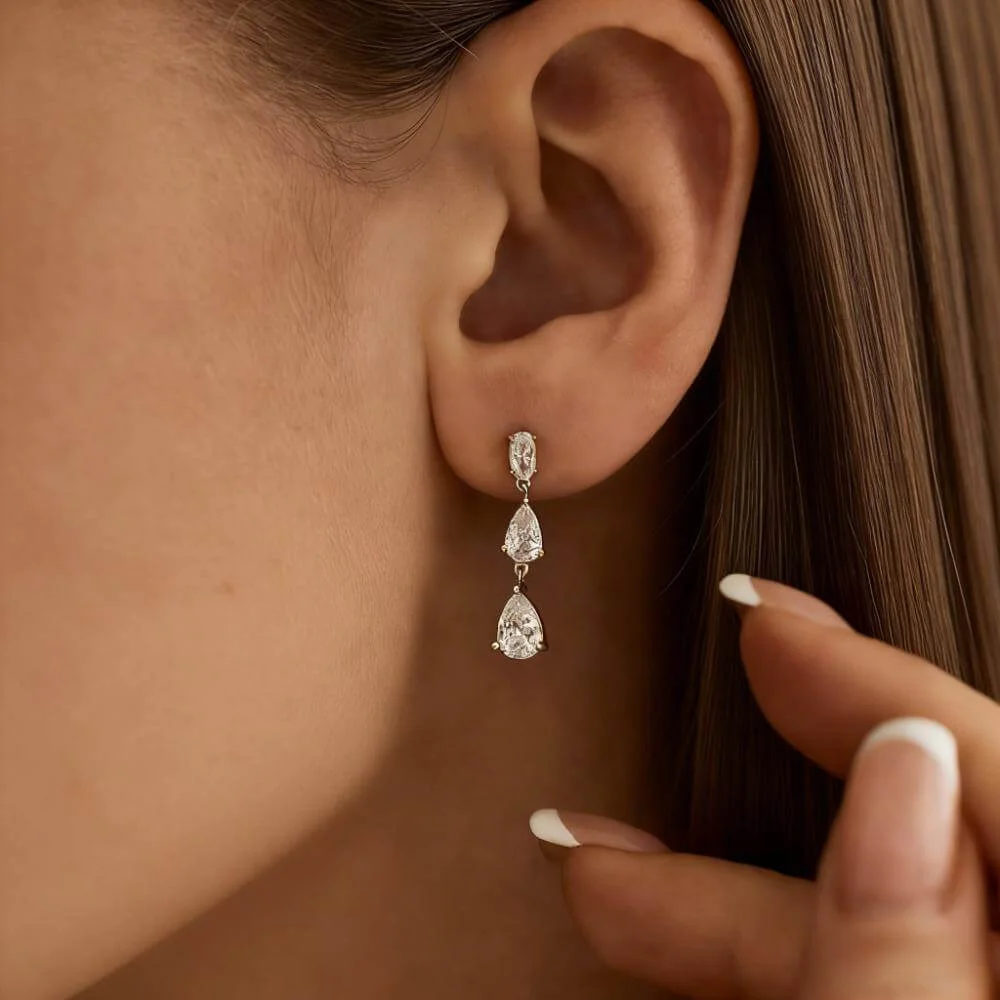
Stone and Setting
Stone Shape
Check that the cut still matches your original item. Round, oval, pear, princess, and cushion stones should keep their intended outline.
Setting Accuracy
Look closely at prongs, bezels, pavé rows, halo edges, and connectors. Small metal details should look clean, not warped or misplaced.
Sparkle Level
Check that the sparkle looks believable. Diamonds should look bright, not glassy, cloudy, or exaggerated.
Wearing and Finish
Ear Position
Check that the earring sits in a natural place. Studs, hoops, drops, and chandeliers should not float, sink, or tilt unnaturally.
Pair Balance
For two earrings, compare size, angle, and height on both sides. The pair should feel even unless the design is intentionally asymmetrical.
Metal Tone
Compare gold, white gold, silver, or platinum color against the source image. The finish should stay consistent across the final gallery.
Where to Use AI Diamond Earrings Model Photos
Use diamond earrings on model images across your store, marketplace listings, and marketing channels. They work best as supporting content that helps shoppers understand the piece beyond a standard product-only shot.
Etsy and Shopify Galleries
Add diamond earring photos to your product gallery, collection pages, and store sections. They can make each listing feel more complete and help buyers compare styles without leaving the page.
Amazon Secondary Images
Use generated images as secondary content to support your product detail page. Keep your main image aligned with Amazon requirements, and always review the latest seller guidelines before publishing.
Collection and Launch Pages
Use diamond earring photos for new arrivals, seasonal drops, bridal edits, and gift guides. A consistent image set can make a small collection feel more polished and easier to browse.
Ads, Email, and Social Posts
Create additional assets for Meta ads, Pinterest pins, email campaigns, and short-form content. These images can help a diamond earring design feel more clickable, giftable, and ready for promotion.
AI Diamond Earrings Model FAQ
Find answers about supported diamond earring styles, upload quality, detail accuracy, publishing checks, and how sellers can use AI-generated images across product pages and marketing channels.
What is an AI Diamond Earrings Model?
It is an AI tool that helps jewelry sellers turn a clear diamond earring image into a styled product photo for ecommerce use. It is useful for showing how a pair may look in a styled shopping context before buyers make a decision.
Does it work for diamond studs, hoops, dangles, and bridal earrings?
Yes. It can support many diamond earring types, including studs, hoops, dangles, bridal styles, huggies, ear climbers, jacket earrings, threader earrings, and lab-grown diamond earrings. Cleaner source images usually lead to better results, especially for tiny stones and thin metal parts.
Will the AI keep my diamond earrings accurate?
AI can create polished images quickly, but small jewelry details still need a human check. Review the cut outline, prongs, metal color, pair balance, and overall fit before using the image in a live store.
What kind of source image works best?
Use a sharp, well-lit image with the full earring visible. A simple background, clear diamond detail, and balanced pair angle give the tool better information to work from.
Can this replace professional jewelry photography?
No. Original product images are still important for exact item detail, certification support, marketplace requirements, and buyer trust. AI-generated images work best as supporting content for galleries, ads, campaigns, and collection pages.
How should I check the result before publishing?
Compare the final version with your original item photo. Make sure the stones, metal finish, size impression, and left-right balance still match the actual earrings.
Can I create close-up images of diamond earrings on the ear?
Yes. Close-up ear crops are useful when shoppers need to understand size, lobe position, shine, and how the earring sits in a more realistic shopping context.
Are these images suitable for ads and launch campaigns?
Yes. They can support Meta ads, Pinterest pins, email campaigns, landing pages, new arrivals, bridal edits, and seasonal promotions. For marketplace use, always review the latest seller guidelines before publishing.
What should I do if the result changes small details?
Regenerate with a clearer source image or choose another template. For diamond earrings with tiny stones, pavé rows, or thin metal parts, use the image only after the final details look clean and believable.