
See the Difference: Before & After Nano Banana Jewelry Models
Nano Banana works best when you start from real product images. Here are a few before & after examples so you can see exactly what the AI jewelry model workflow looks like in practice.
From a simple flat lay product photo to a Nano Banana jewelry model image that feels like a real studio shoot.
Turn a basic product close-up into a lifestyle scene with a model, while keeping every detail of your jewelry intact.
Take a customer selfie and instantly show how your necklace and earrings look on a real person with Nano Banana AI try-on.
Start from one clean background product photo and generate multiple jewelry model variations across different skin tones and styles.
What is a Nano Banana Jewelry Model?
“Nano Banana jewelry model” simply means using Google’s image model Nano Banana to place your jewelry products (necklaces, rings, earrings, bracelets, etc.) onto virtual models and generate realistic photos for e-commerce, ads and social media.
For jewelry brands and online sellers, using Nano Banana in this way offers several advantages:
- Turn simple product shots into on-model images that look realistic and aspirational;
- Produce store-ready product images without any Photoshop or retouching skills;
- Reduce studio, model and location costs for every new collection;
- Quickly generate multiple looks and test creatives to improve click-through and conversion rates.
Why AI Jewelry Models Beat Traditional Photo Shoots
For hero campaigns, traditional photo shoots still have their place. But for day‑to‑day e‑commerce images and constant product launches, studio shoots quickly become a problem in terms of cost, speed, and scale. A Nano Banana jewelry model workflow solves the same problem in a more flexible, repeatable way.
Traditional Photo Shoots
✕$30–$500 per shoot
Models, photographers, studio, lighting, makeup add up fast.
✕2–4 weeks turnaround
Scheduling, shooting and retouching mean long wait times.
✕Reshoots are expensive
Small design changes require booking another full session.
✕Limited model diversity
Budget constraints limit representation options.
✕Inconsistent photo style
Multiple shoots create inconsistent lighting and branding.
Nano Banana AI Models
✓$0.10–$1 per image
Generate unlimited variations from a single product photo.
✓30 seconds turnaround
Get professional results instantly, no waiting for schedules.
✓Infinite iterations
Test different styles, poses, and backgrounds instantly.
✓Full model diversity
Generate models of any ethnicity, age, and style on demand.
✓Consistent brand look
Reuse prompts & templates for consistent lighting & branding.
Strengths & Limitations of This AI Jewelry Workflow
Nano Banana is a powerful choice for jewelry brands, but like any AI tool, it has both strengths and limitations. Understanding them helps you set the right expectations for your nano banana jewelry model workflow.
Strengths of Nano Banana for jewelry
- • Face and pose consistency: Nano Banana is excellent at keeping the original face and pose while changing accessories, which is crucial for realistic jewelry try-on.
- • Fine detail rendering: metal reflections, gemstone sparkle and chain textures are preserved in close-up jewelry model images.
- • Photo editing, not just generation: you can edit existing photos (selfies, studio shots) instead of generating everything from scratch.
- • Flexible style control: from clean e‑commerce shots to moody jewelry ad campaigns, you can steer the style through prompts.
- • Catalog-wide consistency: once you’ve tuned a prompt, you can reuse it across whole collection to keep all product photos on-brand.
- • Multi-channel ready outputs: it’s easy to generate different crops and compositions for product pages, ads and social media.
Limitations to be aware of
- • Very intricate designs may simplify: very thin chains or extremely complex settings can sometimes be smoothed out by the model.
- • Extreme poses can break: unusual hand poses or extreme angles may cause distortions in fingers or wrists.
- • Input quality matters: blurry, noisy or low‑resolution product photos will result in weaker nano banana jewelry product photos.
- • Prompt skill helps: while our tool wraps prompts for you, users working directly in Nano Banana still need to experiment for best results.
- • Occasional artifacts: Clasps, overlapping chains or reflections may create small image issues that need a quick manual touch-up.
- • Human review is still required: every image should be checked for realism, brand fit and compliance before going live.
Nano Banana vs Other AI Jewelry Solutions
There are many AI-powered ways to create jewelry product photos today. Here’s how a Nano Banana jewelry model workflow compares to generic image models and other jewelry-focused tools.
| Nano Banana Jewelry Model Workflow | Generic Image Models | Specialized Jewelry Tools | |
|---|---|---|---|
Face & pose consistency | Excellent at keeping real faces and poses while changing accessories. | Can change faces and poses unintentionally when editing. | Usually good, but often limited to a smaller set of presets. |
Jewelry detail quality | High-quality metal and gemstone details in close-up shots. | Can struggle with fine chains and small stones. | Optimized for jewelry, but may lack broader creative control. |
Input workflow | Works well with existing photos (selfies, studio photos) and product shots. | Mostly focused on text-to-image from scratch. | Often “upload product, get preset result”, less flexible. |
Control over style | Prompt-based control from e‑commerce clean to luxury nano banana jewelry ad campaign styles. | Very flexible but harder to keep people and jewelry consistent across images. | Stable look but fewer style variations. |
Best use cases | Turn real-person photos into on-model jewelry images, product page photos and campaign-ready assets. | Concept art, moodboards and non-realistic stylized content. | Fast, template-based product photos for small catalogs. |
Our tool wraps the Nano Banana jewelry model workflow into a simple interface, combining the consistency of specialized jewelry tools with full creative control over your jewelry images.
Nano Banana AI Jewelry Try‑On: From Selfie to Model Photo
Nano Banana doesn’t just generate static product renders. With the right workflow, you can use it as a full nano banana jewelry try-on engine for your brand.
There are two main ways to use Nano Banana jewelry model images for virtual try-on:
1. Turn a customer selfie into a Nano Banana jewelry model
Let your customers upload a selfie and turn it into a Nano Banana jewelry model photo. Nano Banana keeps the face and pose, while you virtually add necklaces, earrings or rings to show how your pieces look in real life.
2. Use generic models for scalable nano banana virtual jewelry try on
If you prefer not to use real customer photos, you can build a library of generic models and use Nano Banana to add your jewelry to them. This creates a scalable nano banana virtual jewelry try on experience where every SKU can be shown on multiple skin tones, ages and styles.
How to Use Nano Banana for Jewelry Model Photos
This workflow is for creators, sellers and designers who want to work directly inside Nano Banana / Gemini.
Prepare your jewelry images
- • Clear product photos of your jewelry.
- • Clean background works best (white or solid color).
- • Ideally, use a flat lay product photo that clearly shows all the details.
- • Optional: a portrait photo if you want to place jewelry on a real model.
Upload / set up the scene
- • Option A – Only product photos → Nano Banana generates the model.
- • Prompt: “Generate a close-up portrait of an elegant model wearing this necklace. Professional lighting and neutral background.”
- • Option B – Model photo + jewelry → Nano Banana adds the jewelry.
- • Prompt: “Keep this model’s face and pose exactly, add this bracelet on model’s wrist naturally, match lighting and style.”
Refine style and details
- • Set background: studio / lifestyle / outdoor.
- • Adjust lighting: soft window / side light / beauty dish.
- • Set model vibe: young / mature / bridal / party.
Export & use
- • Export 1:1, 2:3, 9:16 for each platform.
- • Use for e-commerce, social media, marketing materials
- • Final check: sharpness, reflections, skin tone consistency.
Recommended upload: the perfect product photo for AI Model
When you upload a product image for a jewelry AI model, treat it like a mini studio shoot. The cleaner and clearer the photo, the more realistic your AI model result will be.
Best option: a flat lay product photo
- Shoot from straight above (flat lay) so the whole piece is visible from end to end. Flat lay shots are widely recommended for jewelry because they show shape and layout very clearly.
- Show every detail: the pendant or main design, the clasp, extender chain, jump rings and any small metal parts, not cut off at the edge of the frame. Close‑ups of clasps and unique features help both customers and AI “understand” the piece.
- For pieces with gemstones or natural materials, make sure the natural stone texture, veining and facets are sharp and easy to see, not blurred into a flat color. High‑resolution base images (around 1000×1000 px or higher) are ideal for virtual try‑on workflows.
- Use a solid, clean background (pure white, light grey or another light neutral). Minimal, single‑color flat lay surfaces keep the focus on the jewelry and work especially well for both human shoppers and AI.
- Keep the jewelry dust‑free and fingerprint‑free, and avoid heavy props that cast strange shadows or reflections onto the metal or stones.
Recommended Settings for Best Nano Banana Jewelry Model Results
To get consistent jewelry model results, it helps to standardize both your input photos and your output sizes. Use the settings below as a practical checklist for your workflow.
| Input | Output | ||
|---|---|---|---|
| Resolution | Aim for product photos with a longest side of at least 1024–1500 px so Nano Banana can capture fine details. | Resolution | Generate at a high enough resolution for cropping (for example, 1500–2048 px on the longest side for each image). |
| Background | Ideally use a clean, solid background (white, light grey or a simple gradient) to make the jewelry stand out. | File formats | Use JPEG for most product and campaign images; use PNG when you need higher quality or plan to do additional editing. |
| Composition | Center the product with a bit of breathing room around it so the model has space to place it on a person. | Backgrounds | Keep a solid, clean background for e-commerce clarity, and create separate lifestyle versions for ads and social media. |
| Product type |
| Aspect ratios & Platform sizes | Aspect ratios Prepare a few key ratios from the same Nano Banana jewelry model image: 1:1, 3:4 or 4:5 for product pages, 9:16 for stories and vertical video covers. Platform sizes Shopify / Shopee / Lazada: 1:1 and 3:4; |
| Ideally, use a flat lay product photo that clearly shows all the details. | As a simple rule, create one high‑resolution Nano Banana jewelry model image per product, then derive platform-specific crops from that master version. | ||
Free Prompt Pack for AI Jewelry Try‑On (Copy & Paste Ready)
Don’t want to start from a blank page? Use this free pack of photo prompts to create consistent Nano Banana jewelry product photos and model shots in seconds.
Unless otherwise specified, you can assume the following defaults:
Aspect ratio: square 1:1, suitable for most e‑commerce product images.
Background: a clean, light background (white or light grey) that keeps the focus on the jewelry.
Resolution: generate at least 1024–2500 px on the longest side to preserve fine details.
File formats (JPEG/PNG/WebP) are controlled by your tool or export settings, not by the prompt itself. For platform-specific needs (e.g. Instagram 4:5 or Stories 9:16), you can add the aspect ratio to the prompt as needed.
Add necklace on AI model prompts
1. Chest-Up Studio Portrait (Necklace Focus)
Create a portrait showing a woman from shoulders to chest wearing this [NECKLACE PHOTO]. Neutral studio background, soft window light, natural skin texture, the necklace centered and clearly visible, styled as a clean on-model image for e-commerce product pages.
2. Elegant Side-Profile Necklace Showcase
Generate an elegant side-profile image of a woman wearing this [NECKLACE PHOTO], hair gently tucked behind the ear and shoulder. Focus on the neck and collarbone area, soft blurred background, minimal composition, perfect for a hero image in a necklace collection.
3. Selfie-Style Virtual Necklace Try-On
Turn a casual selfie-style portrait into a jewelry try-on image by adding this [NECKLACE PHOTO] around the person's neck. Smartphone framing, natural indoor light, relaxed expression, realistic shadows and reflections on the chain for a believable virtual try-on result.
4. Outdoor Lifestyle Portrait with Necklace
Show this [NECKLACE PHOTO] on a model walking outdoors in a city street, mid-shot from waist to head. Soft daylight, subtle motion blur in the background, the necklace catching highlights on the chest, styled as a lifestyle look for social media posts.
5. Close-Up Neck and Collarbone Detail
Create a close-up image focusing on the neck and lower face, with this [NECKLACE PHOTO] resting just above the collarbone. Shallow depth of field, creamy bokeh background, fine detail on the pendant and chain, designed as a detail shot within a try-on gallery.
6. Classic Shirt and Necklace Styling Shot
Generate a model wearing this [NECKLACE PHOTO] with a simple white shirt or blouse, straight-on camera angle, neutral studio background. Emphasize how the necklace sits against the neckline, ideal as a standard styling reference on e-commerce product pages.
7. Bridal Necklace Model Portrait
Create a bridal portrait using this necklace photo as the reference. Show a bride wearing the necklace with soft, warm lighting, a lace or satin dress, and a softly blurred floral background. Keep the necklace elegant, prominent, and true to the original design, suitable for a wedding collection campaign.
8. Diverse Models Grid (Three Skin Tones)
Generate a grid of three portraits, all wearing this [NECKLACE PHOTO] but with different skin tones and hairstyles. Consistent lighting and background, showing diverse representation and how the necklace appears on various customers.
9. Window-Light Lifestyle Necklace Portrait
Create a vertical 4:5 portrait for Instagram, focusing on a woman seated by a window wearing this [NECKLACE PHOTO]. Natural daylight, subtle shadows, casual outfit, the necklace clearly visible yet integrated naturally into the scene.
10. Candid Necklace Adjustment Close-Up
Generate a close-up where the person is gently adjusting this [NECKLACE PHOTO] with their hand. Focus on the pendant, fingers and collarbone, soft neutral background, emotional and candid feel, ideal for ads or storytelling images.
Tips: Use these prompts as a starting point: replace the bracketed parts with your own product details and then adjust the wording, styles and scenarios to match your brand voice, colors and campaign themes.
Don’t want to write prompts? Use our tool
If you don’t want to spend time crafting prompts and simply want to batch-generate jewelry model photos with a single click, use our AI jewelry model tool — powered by Nano Banana, with all prompts and parameters handled for you in a simple interface. Watch the short demo below to see how to use ai to combine jewelry upon a model with our Jewelry Model Generator in just a few clicks.
Step 1
Upload Product
Upload or select your jewelry product image. Jpg, png, webp are supported.
Step 2
Choose Style
Choose the model type, skin tone and style. Prompts are optional.
Step 3
Generate
Generate multiple model photos in one click, auto-sized for e-commerce and social.
Why use our AI Jewelry Model Tool?
Our Jewelry AI Model Tool is built specifically for jewelry brands that need realistic on‑model photos without studios or Photoshop. The features below show how it turns Nano Banana into a practical, everyday workflow:
Jewelry-ready compositions
Pre-configured angles and lighting designed specifically for rings, necklaces, earrings and bracelets.
Sharp, high-resolution output
Every image is generated at high resolution with crisp metal and gemstone details.
One-click batch generation
Create dozens of Nano Banana jewelry product photos in a single run instead of editing one by one.
No prompt writing required
Built-in styles and templates mean you never have to craft or test complex prompts.
Consistent brand look
Use the same image style across all SKUs so your store, ads and campaigns feel polished and on-brand.
Diverse models and skin tones
Preview your pieces on different model types and skin tones with just a few clicks.
Store & social-ready formats
Export images in sizes optimized for product pages, ads and social feeds (1:1, 3:4, 9:16, etc.).
Powered by Nano Banana
Our interface wraps Nano Banana’s capabilities into a simple workflow tailored to jewelry brands.
Where AI Jewelry Models Work Best
Here are some practical ways to use your Nano Banana jewelry model images in real business scenarios.
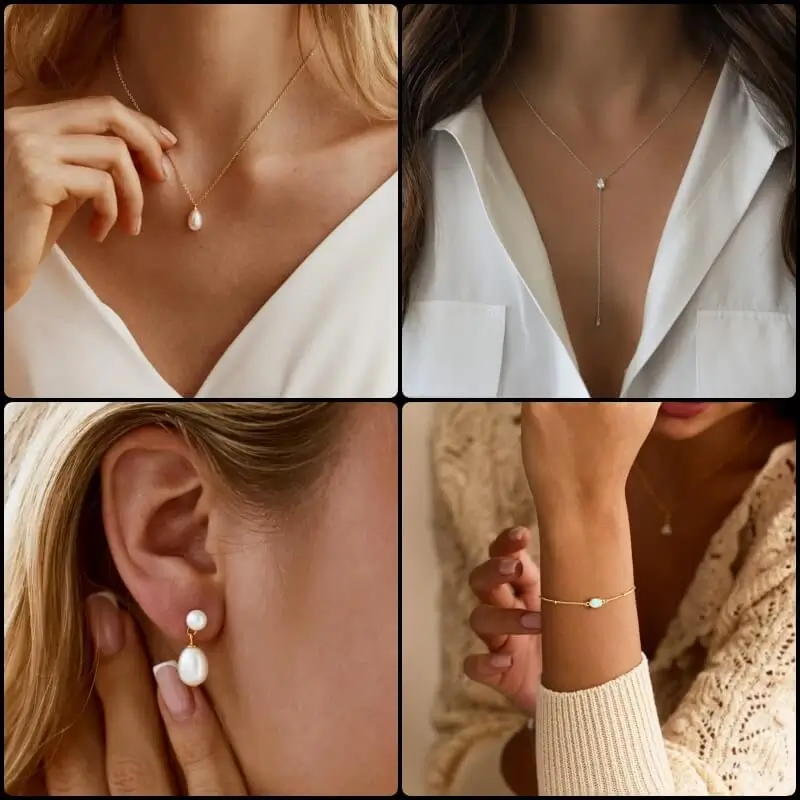
E-commerce product pages
Generate 1–3 Nano Banana jewelry product photos per SKU to complement packshots and increase conversion.
Virtual try-on galleries
Create a series of models with different skin tones and styles wearing the same collection. Perfect for building Nano Banana virtual jewelry try on experiences on your website or app.
Brand campaigns & social media
Produce lifestyle scenes with consistent brand mood for Instagram, TikTok and more, and run a Nano Banana jewelry ad campaign without a full photo shoot.
B2B catalogs & line sheets
Show realistic model photos of designs before full production and keep your catalogs consistent.
FAQ: Nano Banana Jewelry Model
What is “nano banada jewelry model”? Is that spelling correct?
The correct spelling is “Nano Banana jewelry model”, and it refers to using Google’s Nano Banana image model to place real jewelry photos onto models or customer photos for realistic on‑model try‑on images.
How is Nano Banana different from other AI models for jewelry?
Nano Banana is strong at keeping real faces and poses while changing accessories, and at preserving fine metal and gemstone details at high resolution.
Do I need to know how to use Nano Banana or write prompts?
No. Our AI Jewelry Model Tool hides prompts and settings behind a simple interface — you just upload jewelry photos, choose a style and generate images, without touching Nano Banana directly.
What kind of photos give the best results?
Use clear, well‑lit product shots on simple backgrounds and portraits where the face, ears, hands or neck are unobstructed; clean input images make try‑on results much more accurate and realistic.
How accurate are virtual try‑on images for size and fit?
They can help shoppers understand style and proportion, but exact size decisions should still rely on measurements, size charts and clear product descriptions.
Can AI jewelry model photos fully replace studio photo shoots?
For everyday product pages, updates and social media, yes in many cases; for flagship campaigns or high‑end editorials, most brands still mix AI images with a few traditional shoots.
Is it safe to upload my face or customer photos?
Only upload photos you have rights to use, avoid sensitive context, always get consent and check how your images are stored and deleted in the tool’s privacy policy.
Can I use Nano Banana jewelry model images commercially?
Technically they are high‑quality enough for stores and ads, but you must follow Google’s Gemini terms and each platform’s rules, and seek legal advice if you’re unsure.
How is Nano Banana different from AR virtual try‑on?
AR try‑on overlays jewelry live in the camera, while Nano Banana generates edited still images; Nano Banana is better for creating high‑quality model photos and static try‑on galleries.
Is Nano Banana free, and how is your tool priced?
Nano Banana has a free tier with usage limits plus paid plans; our AI Jewelry Model Tool adds its own pricing on top — please see our pricing page for current details.
What is Nano Banana Pro, and do I need it for jewelry models?
Nano Banana Pro is the advanced Gemini 3 Pro image model with higher resolution and more precise control; for most jewelry try‑on images Nano Banana is enough, but Pro can help when you need the very best detail and consistency for campaigns.