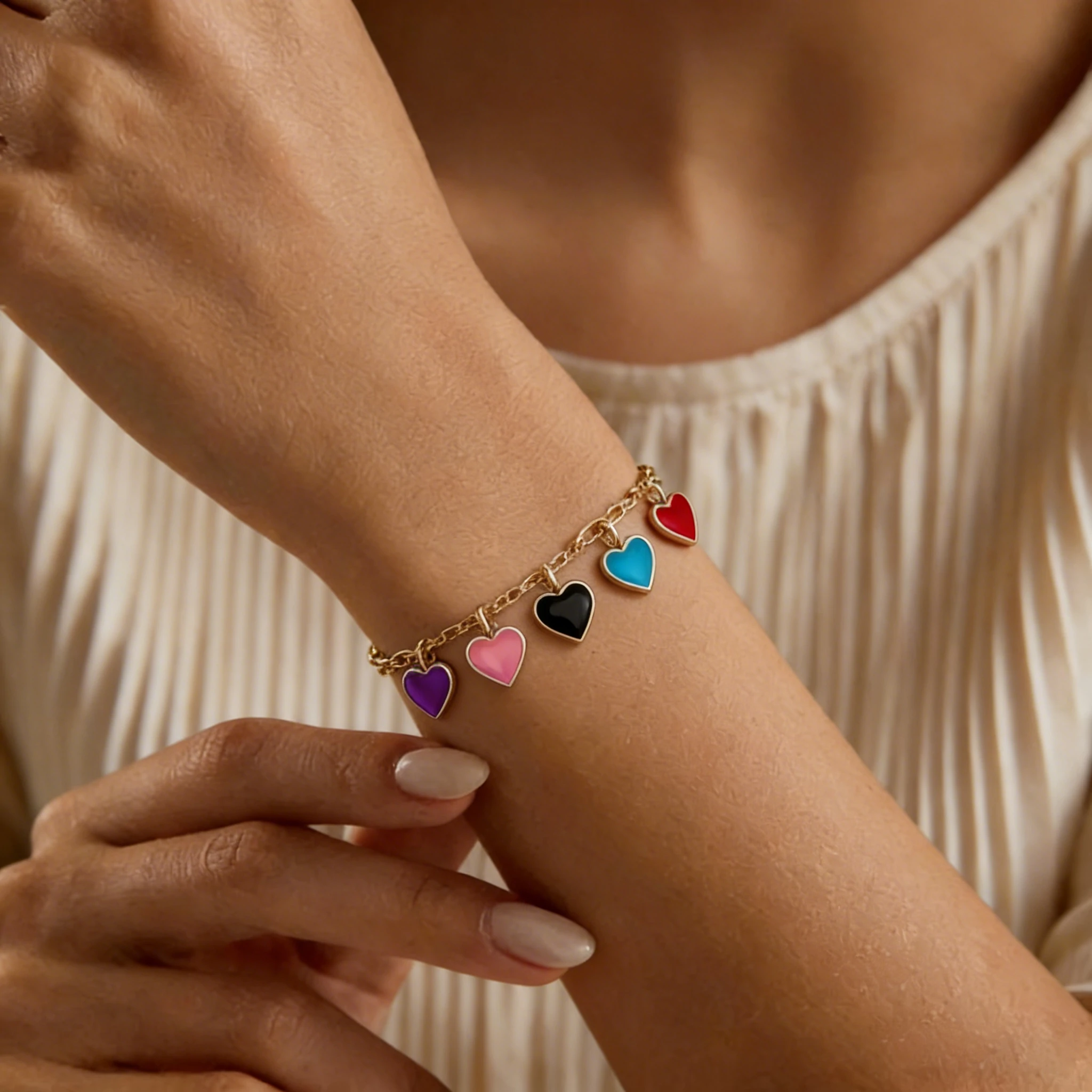
Charm Bracelet Model
See how individual charms hang from the bracelet.

Our AI tennis bracelet model turns a clean product shot into on‑wrist photos so buyers instantly see sparkle, scale and real‑life fit — ideal for product pages, ads and marketplaces like Amazon, Etsy and Shopify.
See how flat bracelet images turn into on‑wrist photos that show real-life fit, stone size and overall presence, giving shoppers a clearer picture before they buy.
A simple studio shot becomes a focused wrist view where the line of diamonds and the bracelet’s true width are much easier to read.
Lying flat, the bracelet looks heavy and hard to judge, but on the wrist the double row reads as a bold, full piece.
In the product shot, color can look muted, but the on‑wrist view makes every ruby and sapphire stand out in real lighting.
Off‑wrist it’s hard to see scale, but on a broader wrist the weight, proportion and everyday fit are immediately clear.
Online shoppers can’t pick up or try on your bracelets. They rely on photos to decide whether a piece feels delicate or substantial, how much it sparkles and whether it suits their everyday style. Because tennis bracelets are long, slim, and made from a continuous row of stones, flat product shots often fail to show the key details that buyers care about most — width, curve, and how the bracelet sits when worn.
✕Hard to judge true fit & size
Buyers can’t tell if the bracelet will feel too tight or too loose when they wear it from a flat product photo alone.
✕No sense of proportion or fit
A flat photo can’t show how the bracelet rests when worn or whether it will look too small, too big or unbalanced.
✕Layered looks are hard to imagine
Without a wrist in the frame, buyers can’t picture how the bracelet stacks with a watch or other bracelets.
✕Sparkle and stone pattern look muted
Diamonds and gemstones look flat in straight‑on photos, and multi‑row tennis designs lose their rhythm and sparkle.
✕Extra work for each new design
Every new jewelry style needs fresh photos and edits, because flat shots can’t fully show how each design wears.
✓Instantly clear fit & size
Seeing it on a wrist makes fit obvious, whether it’s worn snug for luxury or relaxed for daily wear.
✓Real‑life proportions make a difference
Wrist shots reveal true width, thickness and presence, from fine single‑row tennis bracelets to bold double‑row designs.
✓Sparkle and stone layout stand out
Light and natural movement bring out gemstone sparkle and make the stone pattern easy to see.
✓Easily showcase layering and stacking
On‑wrist images show how the bracelet stacks with other jewelry pieces, giving buyers easy styling ideas.
✓More trust and fewer returns
Realistic wrist photos set accurate expectations about look and size, reducing “didn’t match the pictures” returns.
You don’t need a new photoshoot for every angle. Start with one clean product photo, then build this simple set of images to cover what buyers care about most. Every view can be generated from the same source image using our AI workflow.
A sharp, front‑facing photo of the full bracelet on a light background. Ideal as your primary listing image and as the base for generating on‑wrist views.
A tight wrist shot that shows how it curves and how wide it looks in real life. Perfect as the second image after your main product photo.
A 45° angle where diamonds or gemstones catch the light, highlighting brilliance and setting details for classic and multi‑row designs.
A wider view of the piece with part of an outfit, so shoppers can picture how it fits into everyday looks or special occasions.
A wrist photo showing the bracelet stacked with other bracelets, giving buyers layering ideas and supporting bundles and upsells.
A focused close‑up of the clasp and safety features, especially useful for higher‑priced pieces where buyers care about quality and security.
Fit guide
Fit matters most for this style. A small change in length can shift the look from polished and snug to everyday relaxed or stackable.
Length & sizing
Fit starts with picking the right length. These are common ranges and how they tend to wear.
Consistency
Make sure the fit shown in your photos matches the sizing promise you make on the product page.
Turning a single bracelet product photo into on‑wrist images is a simple three‑step flow. All it takes is one product shot and a few clicks.
Step 1
Use a clear product shot on a plain background where the stone layout, width and metal color are easy to see.
Step 2
Pick a wrist preset that matches your customer (skin tone, hand pose, overall vibe), then click the “Add Jewelry to AI Model” button.
Step 3
Download the generated on‑wrist bracelet photos and use them on product pages, ads and marketplace listings.
To get strong AI on‑wrist results, start with clean, simple product photos. You don’t need a studio, but your upload should make it easy to see the bracelet’s stone layout, metal and overall shape. Here’s the ideal upload for our Bracelet AI Model.
AI-generated bracelet on-wrist photos aren’t just for product pages. They give you a flexible image set for listings, ads, emails and wholesale materials.
| Where to use | How to use these AI on‑wrist photos |
|---|---|
| Product detail pages | Add 1–2 on‑wrist photos near size and material info so buyers can see real‑world fit and width. |
| Marketplace galleries (Amazon/Etsy/Shopify) | Keep a white main image and use wrist shots as secondary photos to stand out in search. |
| Performance ads & social media | Use clean wrist shots as ad creatives and posts to show real‑life sparkle and styling. |
| Email campaigns & promos | Drop a few on‑wrist images into launch and promo emails to make products feel tangible. |
| Wholesale catalogs & line sheets | Place wrist photos next to specs and pricing so buyers can judge scale at a glance. |
AI-generated on-wrist photos for this style of bracelet are used across many types of jewelry businesses. Here are the sellers and teams that use them most often.
Use realistic wrist shots to present high‑ticket diamond and lab‑grown pieces online, alongside certificates and detailed specs.
Create polished bracelet images for seasonal drops and new collections without booking models or studios.
Upgrade simple packshots into on‑wrist photos on Amazon, Etsy or Shopify, so each listing looks more premium and compliant without extra gear or retouching.
Add wrist previews to digital catalogs and line sheets so retail buyers can judge width, stone layout and stacking potential at a glance.
Create matching on-wrist photos for your website, marketplaces and in-store displays across sizes, metals and stone options.
Generate fresh creatives for ads, landing pages and social tests from a single product photo, making it easier to launch and A/B‑test campaigns without waiting on new shoots.
Choose this generator when you need on‑wrist photos that stay true to your design. It’s tuned for long, slim line bracelets, keeps stone rhythm and metal tone accurate, and lets you build a full set of model‑ready images from the product shots you already have.
Tuned for long, slim designs with a repeating line of stones, so the bracelet curve, clasp and overall shape look natural on the wrist instead of like a random AI edit.
The generator follows your original stone spacing and width, and keeps metal tone true to your upload — whether it’s a diamond tennis bracelet in white gold or a colorful ruby or sapphire line.
No new photoshoot needed. A clean product shot is enough to create multiple on‑wrist images: close‑ups, side views, outfit context and stacked looks.
Reuse the same wrist presets and styling across your jewelry collection so every listing feels like part of one polished brand, even as you add new widths, metals and stone colors.
Bracelet Models
See how different bracelet styles look on models and find inspiration for your product photos.
See how individual charms hang from the bracelet.

A closer look at colorful threads and woven patterns.

Highlight bead colors and textures in on-wrist photos.

Showcase birthstone colors and personalized details.

Show off chain links and metal finishes on the wrist.

Explore bold cuff designs through model photos.
Answers to the most common questions about using AI‑generated on‑wrist photos — from what to upload to how fit, sizing and marketplaces work with these images.
It is a virtual wrist model designed specifically for tennis bracelets. You upload a clean photo of the piece, and the system generates images of an AI model wearing your tennis bracelet, following your stone layout, width and metal color so shoppers see how it actually looks when worn.
AI-powered on‑wrist photography lets you create these images without booking studios, models or retouchers. You still start from a real product photo, but instead of scheduling a full shoot you use the generator to place the design on a virtual wrist. For many brands this is faster and more flexible than a traditional shoot, especially when you need new views for diamond, gold or silver tennis bracelets, different metals or updated collections.
Start with a clear, product‑only image on a simple background. The bracelet should be fully visible so the stones, overall width and metal tone are easy to read. Avoid heavy filters, extreme angles or group images with several pieces overlapping — those make it harder for the AI to read the design accurately.
Yes. The model is tuned to stay close to your original design. It follows the spacing and rhythm of the stones, keeps the metal finish consistent (white, yellow, rose or silver), and aims to preserve the look of your piece rather than turning it into a generic dotted line.
It’s built to handle a wide range of line‑bracelet styles: classic diamond versions, gold or silver designs, men’s pieces, single and double‑row layouts, and colored‑stone lines such as ruby or sapphire. As long as the upload shows the stones and metal clearly, the wrist preview will adapt to that style.
Most sizing advice suggests a close fit with a little room to move — often about a finger’s space between metal and skin. In the generator, you can choose whether the bracelet sits snug for a “quiet luxury” look, at a regular everyday looseness, or with extra ease for stacking, so the generated photos match the fit you describe on the product page.
For most listings, four to six images are enough: a clean product‑only main shot, a wrist close‑up, a side‑view sparkle detail, a wider wrist‑with‑outfit image, a stacked shot with other jewelry styles, and an optional clasp / safety close‑up for higher‑ticket pieces. All of these can be created from the same original product photo.
Yes. Many sellers use these images as secondary gallery photos and for ads or storefront banners. Keep a simple product-only image as your main photo to match marketplace rules, and use the generated wrist shots in supporting slots as long as they represent the piece truthfully.
We do. You can create wrist images for men’s and unisex designs by picking presets that feel right for your customer base, then adjusting the fit to show how a wider or heavier bracelet sits in real life.
The images you create in AI Jewelry Model are intended for commercial use: product pages, your own site, social posts, emails and ad creatives, provided you follow our license and each platform’s policies. They can replace or complement traditional studio photography for this style of bracelet in everyday marketing.
Yes. Your uploads and the images we generate from them are kept only long enough for processing and download, then automatically removed within 24 hours. We never add your designs to a public stock library, and other users can’t see or reuse your bracelets without your permission.
High‑resolution JPG, PNG or WebP files work best. Aim for at least 1200–1600px on the shortest side so individual stones and metal details stay sharp. Try to avoid heavily compressed files, screenshots or tiny cropped images where the piece turns soft or grainy when zoomed in.
Yes. Once you’ve uploaded a product photo, you can reuse it with different wrist presets — changing skin tone, pose and styling — to match different customer groups or campaigns, without needing a new photoshoot each time.