
Friendship Bracelet Model
A closer look at colorful threads and woven patterns.

Use AI Charm Bracelet Model to generate realistic on‑model images from simple charm bracelet product photos. Show charms and stacked styles in lifelike detail—no models or photoshoots needed. Try now!
See how our AI charm bracelet model generator transforms simple product photos into wrist-view photos that feel real and shoppable. Each pair shows a studio shot next to an AI-generated wrist image, so visitors can see how the chain drapes and how charms and pendants fall.
A clean studio shot shows the gold piece lying flat, while the AI version wraps it around a warm‑tone wrist so you can see how the chain drapes, how the charms fall and the way the metal catches the light.
The plain silver shot shows the cool tone, while the AI on‑skin view adds depth—how the links curve, how much space they leave and how the polished surface stands out.
Laid flat, the modular links look graphic but abstract; on the AI‑generated wrist, each tile snaps into place, showing how the design flows and how motifs line up when worn.
In the product shot you see symbols and colors; in the on‑wrist view you also feel the personality as charms dangle, move with the hand and turn it into a daily good‑luck piece.
Charm bracelets are all about the mix of chain, charms and the story they tell. Flat images capture the pieces, but not how that story actually looks and moves on the wrist. On‑wrist photos close that gap so shoppers can judge fit, charm placement and stacking at a glance before they ever see the charm bracelet on their own wrist.
✕Charm order is hard to imagine
Laid out straight, it’s unclear how each charm will sit once the chain wraps around the wrist.
✕You can’t tell which charms stay visible
Flat shots don’t show which motifs will sit on top of the wrist and which will roll to the underside.
✕No sense of dangle or movement
Charms and pendants look pinned in place instead of swinging and overlapping as you move.
✕Charm scale against the wrist is unclear
A close‑up hides how big each charm will feel next to real skin or how busy a full piece will look.
✕Stacking impact is guesswork
Flat images don’t show how a charm‑heavy piece layers with watches or other pieces on the same arm.
✓Real charm placement and spacing
On‑wrist views show how motifs are spaced around the arm and which ones become the main focal point.
✓Visible vs hidden charms are obvious
You can instantly see which elements stay on top of the wrist and which tuck underneath in daily wear.
✓Movement and dangle feel alive
Seeing charms hang and sway from a wrist turns a flat row of icons into something animated and tactile.
✓True proportion next to skin
On‑wrist photos reveal how large or delicate each charm looks against real skin and how full the design feels.
✓Smarter decisions about stacking
On‑wrist imagery shows how a charm‑heavy design works with other pieces, helping shoppers build stacks with confidence.
It’s an AI‑powered imaging tool that turns your charm bracelet product photos into realistic wrist‑view images. The model reads how the piece is laid out in your shot—chain curve, charm placement and gaps—then generates the hand, skin and lighting around it to create convincing on‑model charm bracelet images, without new shoots or hand models.
Our AI wrist model for charm bracelets is trained specifically on hands and wrists, so it understands how metal, skin and tiny charm details interact. It reads the design from your photo—the curve of the piece, how the charms are arranged and how much room there is between them—then combines that information with the wrist template you select to generate the on‑wrist photo automatically.
The model reads the natural contours and angle of the wrist, so the piece sits in a believable position instead of floating or looking unnaturally tight.
Highlights and shadows are adjusted to the chosen scene, so metal, enamel and stones catch the light in a realistic way instead of looking like a flat sticker on top.
Your uploaded image stays in control of the design. The original chain and charms are kept as they are, while the AI adapts the wrist, pose and background to match—without stretching or blurring the details that matter.
For charm‑heavy designs, the AI respects the spacing and sequence from your photo, so the story you built into the layout is as close as possible to what shoppers see wrapped around the wrist.
Turn a simple product shot into wrist‑view charm photos in three quick steps. You don’t need models, studios or new shoots—just the charm images already in your catalog. The same workflow works for gold, silver and lucky designs, so you can update whole collections at once.
Step 1
Add a clear image of your piece on a plain background so the chain and charms are easy to read.
Step 2
Pick the skin tone, pose and style that best match your customer or campaign.
Step 3
Create on‑wrist images in a few clicks, then download them for product pages, marketplaces and ads.
To let the AI read your charm design correctly, it needs a clean view of every charm, link and gap. Follow this checklist so the wrist‑view results stay close to what you planned.
If part of the chain or some charms are cut off, the model has to guess the full layout instead of matching your real design.
When you shuffle charms into a different order just to fill the frame, the wrist view ends up showing a story you don’t actually sell.
Very tight clusters or huge empty spaces make it hard to read how full the piece should look when worn in real life.
If several pendants sit directly on top of each other, the AI cannot easily separate shapes, and individual charms may blend together.
Props, patterned surfaces or multiple designs in one shot confuse the model about which charms belong to this story.
Any brand selling charm‑based designs can benefit, but some use cases see outsized gains in click‑through and sell‑through. These are the kinds of catalogs and teams that tend to see the biggest lift when they add wrist‑view imagery to their workflow.
| Who it’s for | How they use wrist‑view charm photos |
|---|---|
| Personalized charm lines | Show initials, birthstones and milestone symbols on the wrist so shoppers can picture a custom story as something they’d actually wear. |
| Charm‑heavy collections | When a design has a lot going on, on‑skin views make it easier to read the theme instead of just seeing a busy row of tiny icons. |
| Gift‑focused shops | Use wrist views to position pieces as birthday, friendship or thank‑you gifts—buyers see how meaningful sets look when worn, not just in a box. |
| Marketplace and small sellers | Upgrade basic photos into on-wrist images so listings look more premium and informative without hiring models or booking a studio. |
| Manufacturers and wholesalers | Use wrist‑view images in digital catalogs and line sheets so buyers can quickly judge motif size, fullness and how new charm stories fit into existing ranges. |
Once you have strong wrist‑view images, they become reusable assets across your product pages, marketplaces and campaigns—not just a single gallery shot. For other bracelet types, you can get an overview on the AI Bracelet Model page.
Place one or two wrist‑view images near size and material info so shoppers can see how full the design looks and which charms stay on top.
Keep a plain studio shot as the main image and add wrist views in secondary slots to stand out in Amazon, Etsy or Shopify search while still meeting listing rules.
Use close‑up wrist crops in ads, Reels and posts to show charms swaying and catching the light, instead of just lying flat on a background.
Drop wrist‑view images into launch emails and seasonal gift edits so each charm story feels like a ready‑to‑wear gift, not just a catalog SKU.
If you let customers pick their own motifs, show a wrist preview of the finished combination so they can judge charm order, spacing and overall fullness before checkout.
Add wrist photos to “how to choose your size” or “how to stack” guides so buyers can see how a charm‑heavy design wears alone, with a watch, or as part of a larger stack.
Instead of relying on a generic image editor, you get a workflow built around charms, chains and wrist views. It’s designed to turn the product shots you already have into clear, consistent charm bracelet images that help shoppers understand each design faster and buy with more confidence.
Tuned for pieces with dangles and tiny motifs, so layouts with multiple charms are easier to read on the hand and wrist.
Start from simple studio images on a plain background and upgrade them into wrist‑view photos in a few clicks.
Choose from multiple wrist tones and poses to create images that better match your target shoppers.
Reuse the same framing and style settings so new themes, metals and stories still feel like part of one brand.
Bracelet Models
See how different bracelet styles look on models and find inspiration for your product photos.
A closer look at colorful threads and woven patterns.

Highlight bead colors and textures in on-wrist photos.

Showcase birthstone colors and personalized details.
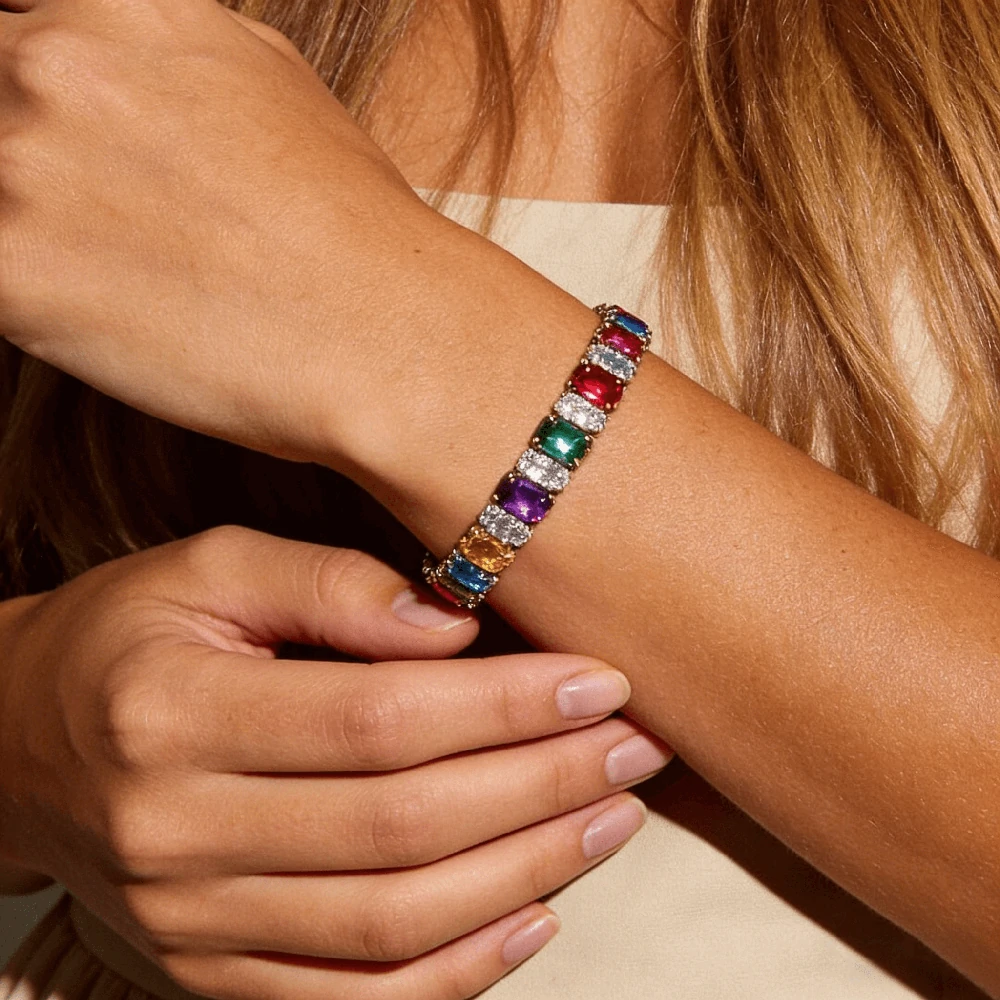
Show sparkle, stone size, and wrist fit.

Show off chain links and metal finishes on the wrist.

Explore bold cuff designs through model photos.
Answers to common questions about turning charm bracelet product photos into realistic wrist‑view images with AI.
It’s an AI tool that turns your charm bracelet product photos into wrist‑view images using a model trained on hands and wrists. You upload a design and get realistic on‑model photos that show how the piece looks when worn.
Live virtual try‑on uses a phone camera or webcam so shoppers see jewelry on their own hand in real time. This AI tool creates static, high‑quality wrist photos using your product images and preset wrists, which you can reuse on product pages, ads and marketplaces.
Use a clear studio image on a plain background where the full piece is visible from clasp to clasp, and every charm is easy to see. High‑resolution JPG, PNG or WEBP with even lighting works best; avoid blurry, cropped or heavily filtered shots.
The generator is designed to stay close to your original layout and charm sequence, using your upload as the layout guide. It may make small adjustments to fit the wrist template, but it will not intentionally invent extra charms.
It works with gold, silver, mixed metal, Italian link styles, “lucky” pieces and more, as long as the source photo clearly shows the chain and motifs. The AI adjusts lighting and reflections so each finish still looks like metal when rendered on skin.
The images are not a precise sizing tool, but they help show how full or relaxed a charm design may look when worn. This gives shoppers a clearer reference before they choose a length, reducing “too tight” or “too loose” concerns.
Yes, they’re intended for use on ecommerce sites, Amazon/Etsy/Shopify listings, social media and ad creatives, as long as you follow your plan’s license and each platform’s content rules.
This page focuses on charm‑based designs, but the same technology can also be used for plain chains, bangles and other wristwear, as long as the product photo clearly shows the piece.
Yes. Choose from wrist templates with different skin tones, poses and styling options, then reuse the same presets to keep your charm collections consistent.
You can try a different wrist template, adjust your source photo (clearer, less cluttered) and regenerate. If a result still feels off, you can simply discard it and keep the versions that stay closest to your original design.